






















Technology
Google Business Profile Checklist for Restaurants: How to Improve Local SEO
Aug 5, 2026
TLDR
A customer searches for dinner nearby, finds your restaurant, and likes the photos. Then they notice that your hours are unclear or the menu shows dishes you stopped serving months ago. That small gap can send them elsewhere. In fact, 64% of US diners Google a restaurant before visiting. Your Google Business Profile often shapes that first impression before a guest reaches your website, calls your team, or walks through the door. Optimizing it helps your restaurant appear in relevant local searches and provides people with up-to-date details they can trust.
What Is a Google Business Profile for Restaurants?
Google Business Profile is the free listing that controls how your restaurant appears across Google Search and Maps. It was previously called Google My Business, so you may still see that name used online.
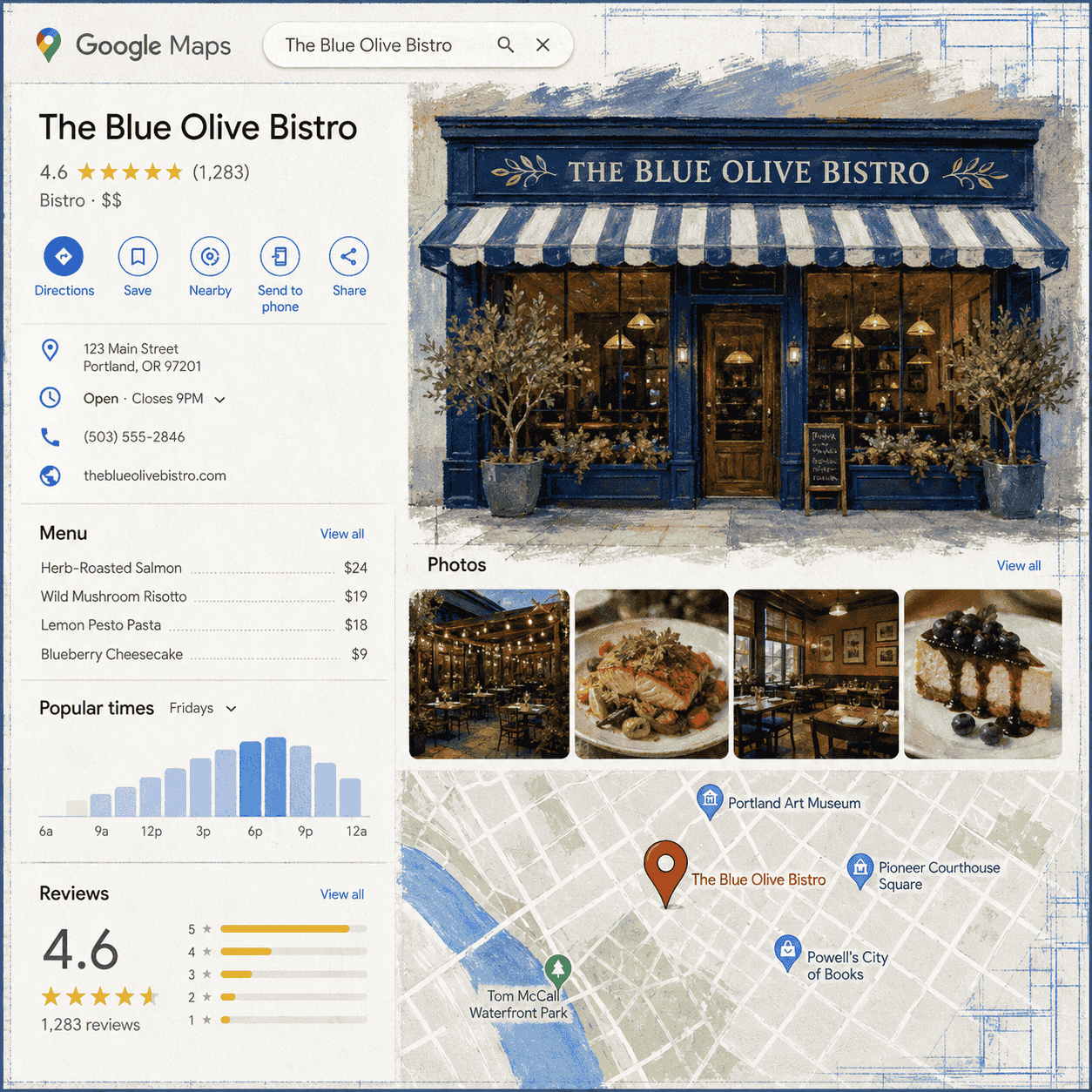
A restaurant profile can display your address, phone number, operating hours, menu, photos, reviews, website, service options, reservations, and ordering links. Customers can use it to get directions, view dishes, call your location, book a table, or start an order.
This makes the profile one of the few places where discovery and action happen together. Someone searching for “Thai food near me” may find your listing and decide where to eat without visiting several restaurant websites first.
How Google Business Profile Helps Restaurant Local SEO
Local SEO helps your restaurant appear when someone searches for food in a particular area. These searches often include a cuisine, a dish, a neighborhood, a dining need, or a time of day.
Common examples include:
• Coffee shop open now
• Best brunch in Brooklyn
• Vegan restaurant in Austin
• Pizza delivery near me
• Restaurant with outdoor seating
Google says its local results are mainly based on relevance, distance, and prominence. Relevance looks at how closely a listing matches the search. Distance considers the restaurant’s location in relation to the person searching. Prominence reflects how established and well-known the business appears online.
You cannot change the customer’s location, but you can give Google a clearer picture of your restaurant. Accurate categories, detailed business information, strong reviews, useful photos, and trusted mentions across the web can all support that picture.
Your listing also affects customer confidence. In a Toast survey, 46% of diners said they were most likely to check Google Reviews first when researching a restaurant. A complete profile supports that research with the practical details people need after reading those reviews. Toast restaurant reviews survey
How to Optimize Your Restaurant’s Google Business Profile
1. Claim and Verify Your Restaurant on Google
Before making any changes, search for your restaurant on Google and Maps. Google may already have a listing created from public information or customer activity. Creating another one could leave you with duplicate profiles, divided reviews, and conflicting details.
If a listing exists, claim it and follow the available verification steps. Google chooses the verification method based on the business and may offer video, phone, email, live call, or mail.
Once approved, review the people who can manage the account. Access should belong to the restaurant owner or another permanent company account. If a former employee or outside agency is the only administrator, regaining control later can become difficult. Add at least one trusted manager as a backup, but avoid giving full access to people who do not need it.
Verification confirms that you are authorized to represent the restaurant. It also allows you to edit key information and respond to customer reviews from the business.
2. Use the Correct Restaurant Name and Categories
Enter the business name exactly as customers see it on your storefront, website, receipts, and menus. Do not add a city, cuisine, or popular search phrase unless it forms part of the official name.
For example:
Correct: Olivia’s Kitchen
Incorrect: Olivia’s Kitchen Best Italian Restaurant in Brooklyn
The second version may look attractive for SEO, but it goes against Google’s naming rules. It can also make the business appear less credible.
Next, choose the category that describes your main offering most closely. “Mexican restaurant,” “bakery,” or “coffee shop” gives Google a clearer signal than the broad “restaurant” category. You can add other categories when they represent a real part of the operation. A bakery with a full coffee program may use “bakery” as its primary category and “coffee shop” as an additional one.
Categories should describe what the business is, not list every item it sells. A few accurate choices are stronger than a long collection of loosely related labels.
3. Complete Your Restaurant Information
Your profile should make it easy for a new customer to find and contact the correct location. Add the full street address, place the map pin at the right entrance, enter a working local phone number, and connect the official website.
Check that the same name, address, and phone number appear on your website and other major listings. Small differences such as an old phone number or previous suite number can create confusion.
Restaurants with several locations should connect each profile to the page for that specific store. Sending every listing to a general home page makes customers search again for the information they expected to find.
You can also add an opening date and supported social profiles. These details are secondary, but they help create a fuller view of the business.
4. Keep Restaurant Hours Accurate on Google
Wrong hours cause a direct customer problem. Someone who arrives after closing may not return, even if the schedule was changed for a valid reason.
Start with your normal opening times. Then add special hours for public holidays, private events, seasonal schedules, and other temporary changes. Google also supports separate service hours for options such as pickup, delivery, drive-through, and brunch.
The difficult part is rarely entering the hours once. It is keeping them current across every place customers look.
A restaurant may update its schedule in Square, on its website, inside its ordering platform, and on the front door. Google becomes another manual task for the team to remember. Holiday periods make this harder because several dates may need individual changes.
Until those systems are connected, assign responsibility to one person or role. Any operational update should trigger a quick review of the public listing. Google may also suggest edits based on data from customers and other sources, so managers should check that accepted information remains correct.
Per Diem’s upcoming Google Business Profile integration is designed to reduce this work by syncing restaurant hours from Square with Google. This will help merchants maintain consistent schedules without entering the same changes in separate places.
5. Write a Clear Restaurant Description
Your description should quickly tell a potential guest what you serve and what kind of experience to expect. Use natural language instead of filling the space with search terms.
A useful description can mention:
• The main cuisine or concept
• The city or neighborhood
• Signature dishes
• Dining style
• Dietary choices
• A meaningful part of the restaurant’s story
For example:
Olivia’s Kitchen is a casual Italian restaurant in Brooklyn serving handmade pasta, wood fired pizza, and seasonal desserts. The menu includes vegetarian choices, family style meals, and weekend brunch.
Google allows up to 750 characters, but a clear description does not need to use the full limit. Avoid links, prices, temporary promotions, and claims you cannot support. Phrases such as “best restaurant near me” sound forced and do little to help a customer understand the place.
6. Add a Complete and Current Restaurant Menu
For many diners, the menu is the deciding point. They want to see the food, current prices, and suitable choices before committing to a visit or order.
Add a direct menu link that works well on mobile. A normal webpage is usually easier to read and search than a small PDF designed for print. Google also lets eligible food businesses organize dishes into sections, include descriptions, enter prices, and upload menu photos.
Use familiar section names such as breakfast, mains, drinks, and desserts. Dish descriptions should explain ingredients or preparation where helpful. There is no need to force location terms into every item name.
The real challenge starts after publishing. Prices change, seasonal dishes rotate, products sell out, and new categories are added. If the restaurant updates Square but leaves Google untouched, customers may make decisions using old information.
Per Diem GBP integration will sync menu information from Square to Google Business Profile. Along with hours syncing, this can reduce repeated admin work and help customers see details that better reflect the restaurant’s current setup.
A connected menu also gives operators greater control over a part of the profile that can quickly become outdated. The goal is simple: when a customer finds the restaurant on Google, the information should match what the team can actually serve.
7. Add Direct Online Ordering and Reservation Links
Once a customer finds your restaurant on Google, make the next step simple. Add links that let them order food or reserve a table without searching through several pages.
Per Diem gives restaurants direct links to their online ordering site and reservation page. These links can be added to the Google Business Profile, helping customers move from local search to the right action quickly.
For online ordering, use the link for the correct restaurant location and test the full experience on a phone. Confirm that the right store opens and that pickup or delivery options work as expected.
Google may display links from several ordering providers. Review them and choose your preferred provider where that option is available. If an old or incorrect service appears, contact Google or the provider to request its removal. This helps guide customers toward the ordering channel your restaurant wants them to use.
If your restaurant is using reservations, then you should also add a reservation link to the profile. Guests can choose an available date and time, enter their details, and book a table directly.
Each restaurant location should have its own ordering and reservation links. Sending customers to a general page adds unnecessary steps and increases the chance that they select the wrong store.
8. Upload Photos That Help Customers Choose
Restaurant photos should answer the questions people have before visiting. What does the food look like? Is the dining room casual or formal? Will they recognize the entrance from the street?
Build a useful set of images that includes:
• The storefront and main sign
• The entrance
• Interior seating
• Signature food and drinks
• Outdoor space
• Parking or access points
• Private dining areas
Use recent photos that reflect the experience. Bright lighting and a clean frame can make food look appealing without heavy editing. Images that look very different from what arrives at the table can create the wrong expectations.
Your logo and cover image also deserve attention. Choose a cover photo that communicates the restaurant concept at a glance. It may show the dining room, a popular dish, or the storefront, depending on what makes the business memorable.
Customers can upload their own images, so review the photo section regularly. You cannot remove an image simply because it is unflattering, but you can report content that breaks Google’s rules.
9. Build a Fair Process for Google Reviews
Reviews can influence local visibility and customer confidence. Google says that review volume and positive ratings can support local ranking, while diners use recent feedback to judge food, service, value, and atmosphere.
Make it easy for every customer to share an honest opinion. Create a direct Google review link and place it where guests naturally interact with the business. Useful locations include receipts, table cards, takeout packaging, and follow-up messages.
Do not offer a discount, free item, loyalty points, or another reward in exchange for a review. Avoid asking only customers who appear happy. Both practices can create a misleading picture of the business and may break Google’s review policies.
A steady flow of genuine feedback is better for customers than a sudden batch of vague comments. Train your team to ask politely without putting pressure on the guest.
Respond to Positive and Negative Reviews
A good response shows that someone at the restaurant is paying attention. Skip generic replies that could belong to any business.
For a positive review, thank the guest and refer to a detail they shared:
Thanks, Mia. We are glad you enjoyed the mushroom pizza and the patio. We hope to serve you again soon.
For a negative review, acknowledge the concern without starting an argument:
Hi Daniel, we are sorry your pickup order was delayed. This is not the timing we aim for. Please contact us at [email address] so our manager can learn more and help.
Keep private details out of public replies. If the complaint involves payment information, employee conduct, or a health concern, move the conversation to a direct channel.
Here’s your guide to get more positive customer reviews fast.
10. Share Offers, Events, and Restaurant Updates
Google posts give restaurants space to feature news, special offers, events, and seasonal items. They can be useful when you have something timely to share, such as a weekend brunch, live music, catering package, or holiday promotion.
Google has also introduced a “What’s happening” area for eligible single-location food and drink businesses in selected countries. It can highlight current events, deals, and specials near the top of the profile. Restaurants may add this content through Google posts or connected social accounts where supported.
Keep each update focused on one message. Add a clear image, provide the essential details, and choose an action button that fits the post. Remove or replace expired promotions so customers do not see an offer that has already ended.
Publishing every day is unnecessary. Share information that gives someone a useful reason to visit, reserve, or order.
11. Give Each Restaurant Location Its Own Local Presence
Every eligible physical restaurant location should have a separate profile. This lets each store collect its own reviews, show relevant photos, and appear in searches near that address.
Connect the listing to a dedicated location page on your website. That page can include directions, parking details, nearby landmarks, local services, and contact information for that store.
Restaurant groups should keep brand presentation consistent while allowing each branch to reflect its real experience. One location may have a patio, another may serve breakfast, and a third may offer catering. Copying every field across the group can leave guests with inaccurate expectations.
Local press coverage, tourism guides, neighborhood associations, food events, and community partnerships can also strengthen the restaurant’s presence beyond Google. Genuine mentions from trusted local sources help people discover the business and can contribute to its prominence.
Contact us to get featured in our neighborhood guides at: support@tryperdiem.com.
12. Track the Actions That Matter
A higher view count can look encouraging, but it does not tell you what customers did next. Google Business Profile performance data can show search terms, calls, direction requests, website visits, menu interactions, and bookings where available.
Review these results each month. Look for patterns tied to changes you made. A new photo set may lead to greater engagement, while a corrected category may bring in searches that fit the restaurant better.
Add UTM tracking to website and ordering URLs. This allows you to identify visits from the profile inside Google Analytics and see which pages or actions follow.
For restaurant groups, compare locations carefully. A downtown store and a suburban branch may attract different searches and customer actions. Use each location’s data to guide its own improvements.
Common Google Business Profile Mistakes Restaurants Make
A few errors can weaken an otherwise useful profile:
• Adding search terms to the official business name
• Creating duplicate listings
• Selecting unrelated categories
• Offering rewards for reviews
• Leaving expired promotions visible
• Sending every store to one general location page
• Ignoring customer questions and suggested edits
• Giving account ownership to a single employee or agency
Set a short monthly review for the profile. Also check it before major holidays, local events, and seasonal campaigns.
FAQs
Is Google Business Profile free for restaurants?
Yes. Creating, claiming, and managing a profile is free. A restaurant may still pay separate companies for ordering, reservation, or management services.
Does every restaurant location need a separate Google Business Profile?
Each eligible physical location should normally have its own listing. This allows Google to show the right branch to nearby customers and keeps reviews and local details organized correctly.
Can a restaurant pay for a higher local ranking?
No. Google does not accept payment for better placement in organic local results. Its local system considers relevance, distance, and prominence. Restaurants can improve their information and reputation, but they cannot purchase an organic position.
How often should a restaurant review its profile?
Check reviews, questions, suggested edits, and public details at least once a month. Review it sooner after any operational change, new campaign, or service update.
Make Every Google Search Count
A well-managed Google Business Profile helps diners understand your restaurant and take the next step with confidence. The work becomes easier when information does not need to be entered by hand across several platforms.
Per Diem’s Google Business Profile integration will sync menu, photos, and business hours from your POS to Google. It will help restaurants reduce manual updates and provide customers with information that closely reflects current operations.
Spend less time correcting listings and give customers a clearer path to your restaurant. Book a demo with Per Diem today.