


























How to Create Affiliate Marketing Campaigns in Per Diem
The Affiliate feature helps you grow your customer base by partnering with creators, influencers, ambassadors, and marketing partners. Create campaigns with custom rewards and tracking links, share them with partners, and track performance from sign up through checkout. Every signup and checkout generated through an affiliate link is automatically attributed back to the campaign.
- Go to: Merchant Dashboard → Marketing → Affiliate
- Click Create a Campaign
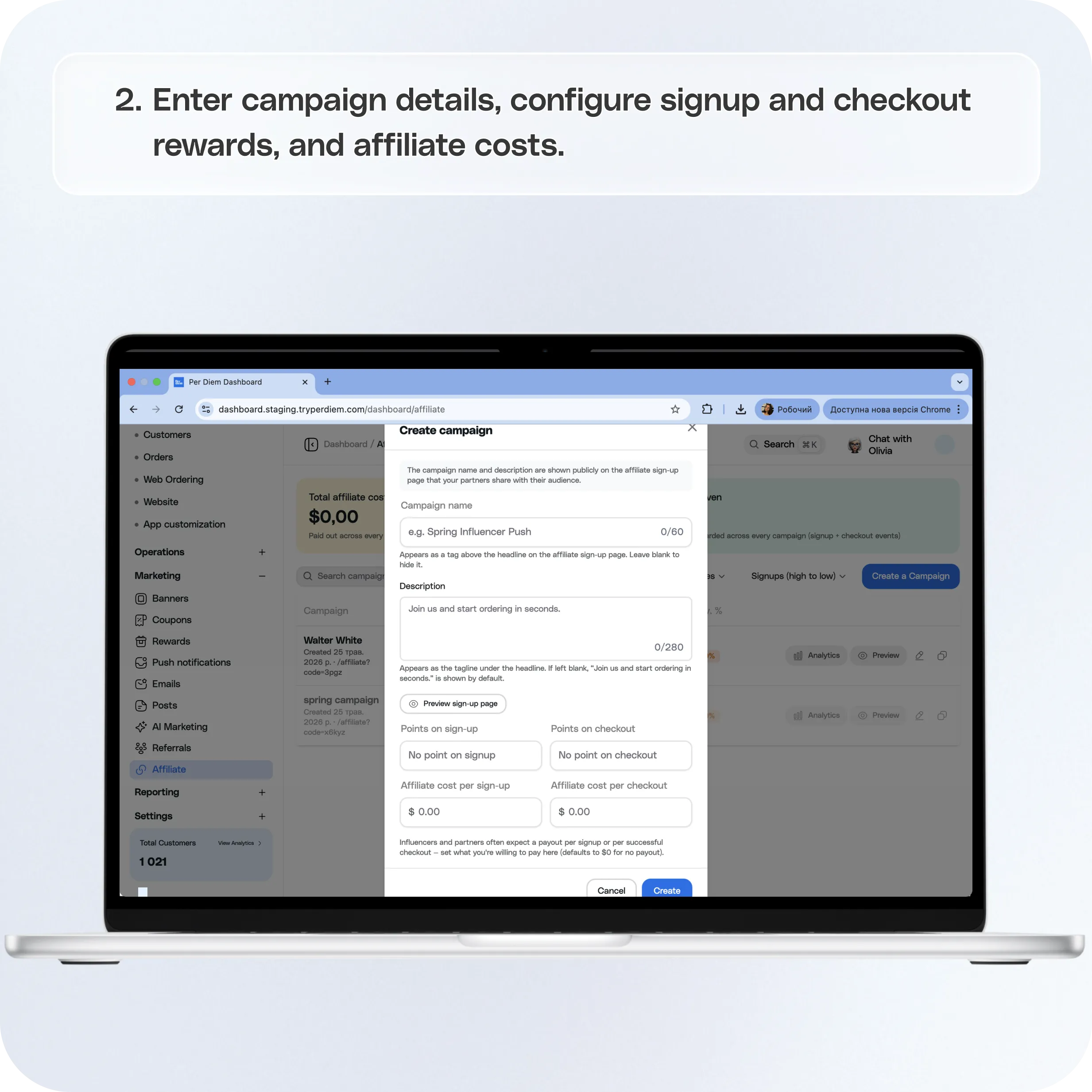
- Enter campaign details
- Configure signup and checkout rewards
- Configure affiliate costs
- Click Create to launch the campaign.
Still require support?
Contact support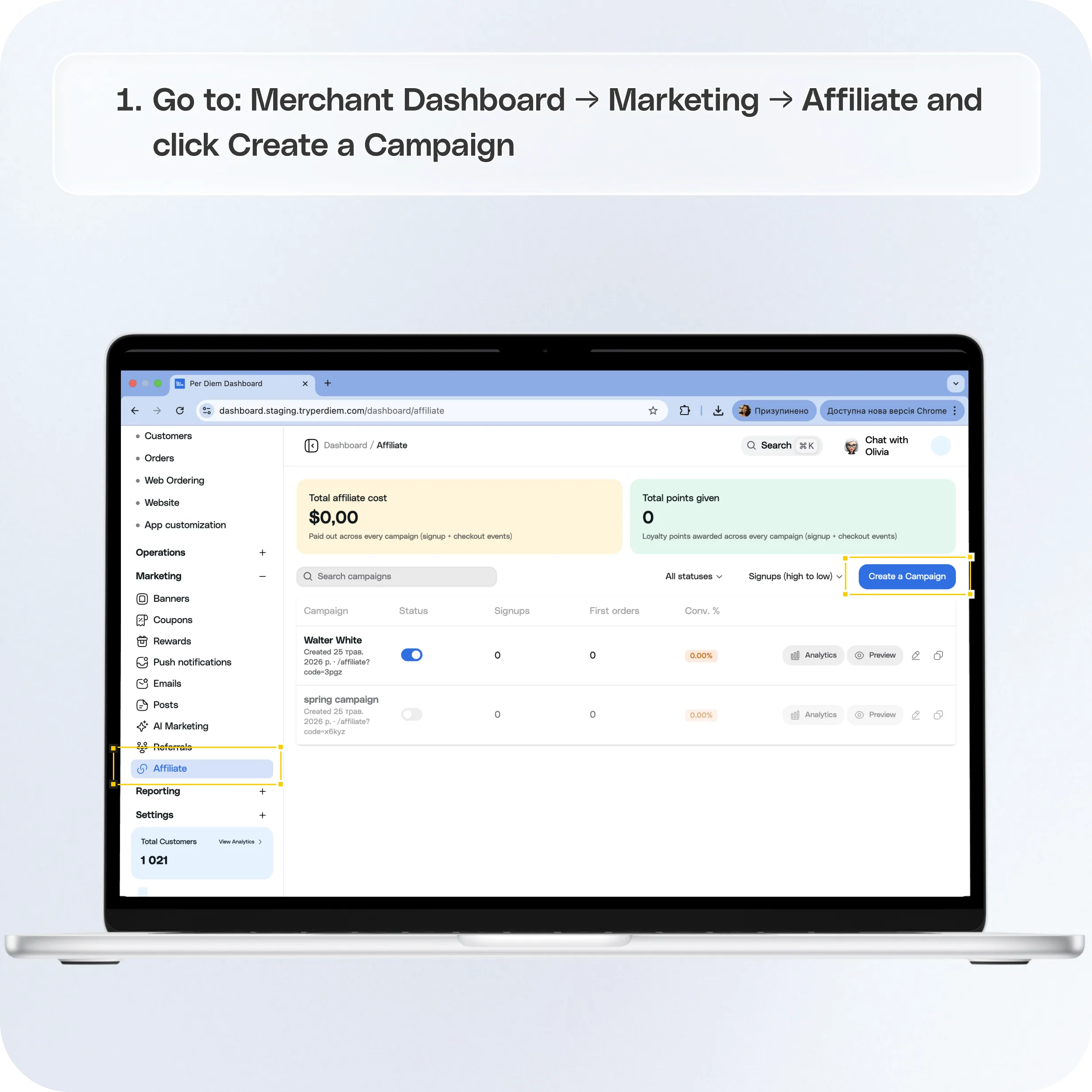
Where to find Affiliate campaigns
Go to:
Merchant Dashboard → Marketing → Affiliate
From here you can:
- Create affiliate campaigns
- Share campaign links and codes
- Track campaign performance
- View signups and conversion metrics
Create an Affiliate Campaign
Step 1: Open Affiliate
Navigate to:
Marketing → Affiliate
Step 2: Click Create a Campaign
Click Create a Campaign
Step 3: Enter campaign details
Add:
- Campaign name
- Campaign description
**Important:
**Your campaign name and description are shown publicly on the affiliate signup page that partners share with their audience.
Make sure this information clearly explains the campaign and rewards being offered.
Step 4: Configure signup and checkout rewards
Choose how many loyalty points customers receive for:
- Sign up rewards
- Successful checkout rewards
These rewards are automatically granted when customers complete qualifying actions through the affiliate campaign.
Step 5: Configure affiliate costs
Set:
- Affiliate cost per signup
- Affiliate cost per checkout
These values help track campaign spend and attribution costs.
Step 6: Click Create
Click Create to launch the campaign.
Once created, your campaign becomes active and generates a unique campaign code and affiliate link.
Share Your Affiliate Campaign
After creating a campaign, Per Diem automatically generates:
- Campaign code
- Affiliate link
Share these with your:
- Marketing partners
- Influencers
- Brand ambassadors
- Affiliate partners
Signups and checkouts completed through the affiliate link are automatically attributed to that campaign.
How attribution works
Customers who:
- Sign up using the affiliate link
- Complete checkouts through the affiliate campaign flow
will automatically count toward campaign performance.
No manual tracking is required.
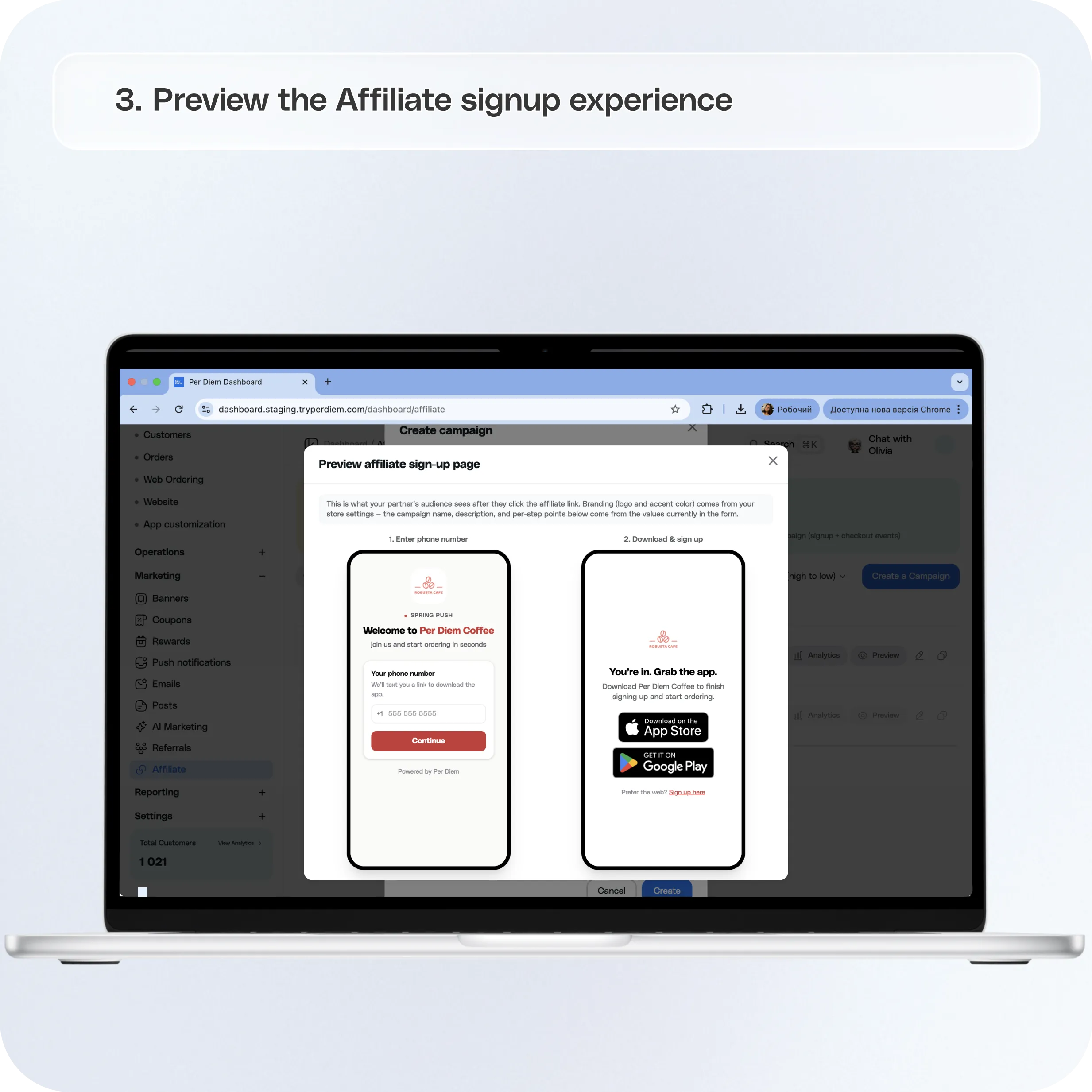
Preview the Affiliate Signup Experience
Before sharing a campaign, you can preview how customers will experience the signup flow.
Click Preview on the campaign.
This allows you to review:
- Campaign branding
- Campaign title and description
- Signup experience
- Download and onboarding flow
The branding shown comes from your store settings.
View Campaign Performance
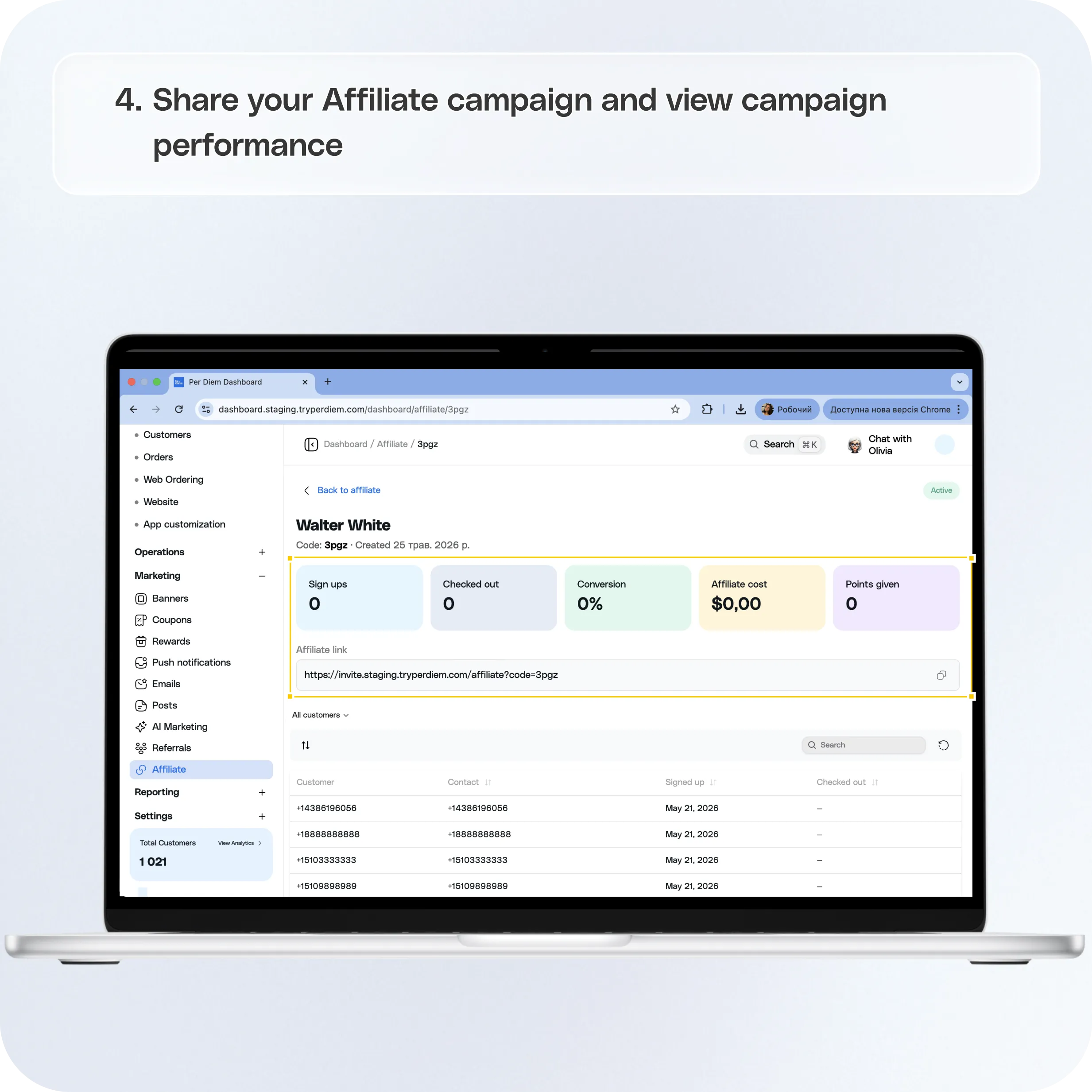
Once a campaign is live, you can monitor performance directly from the Affiliate dashboard.
Click the campaign name to open campaign analytics.
Available campaign metrics
Campaign analytics include:
**Sign ups
**Total customers who joined through the affiliate campaign
**Checked out
**Customers who completed their first purchase
**Conversion rate
**Percentage of signups that converted into checkouts
**Affiliate cost
**Total campaign cost attributed to signup and checkout activity
**Points given
**Total loyalty points distributed through the campaign
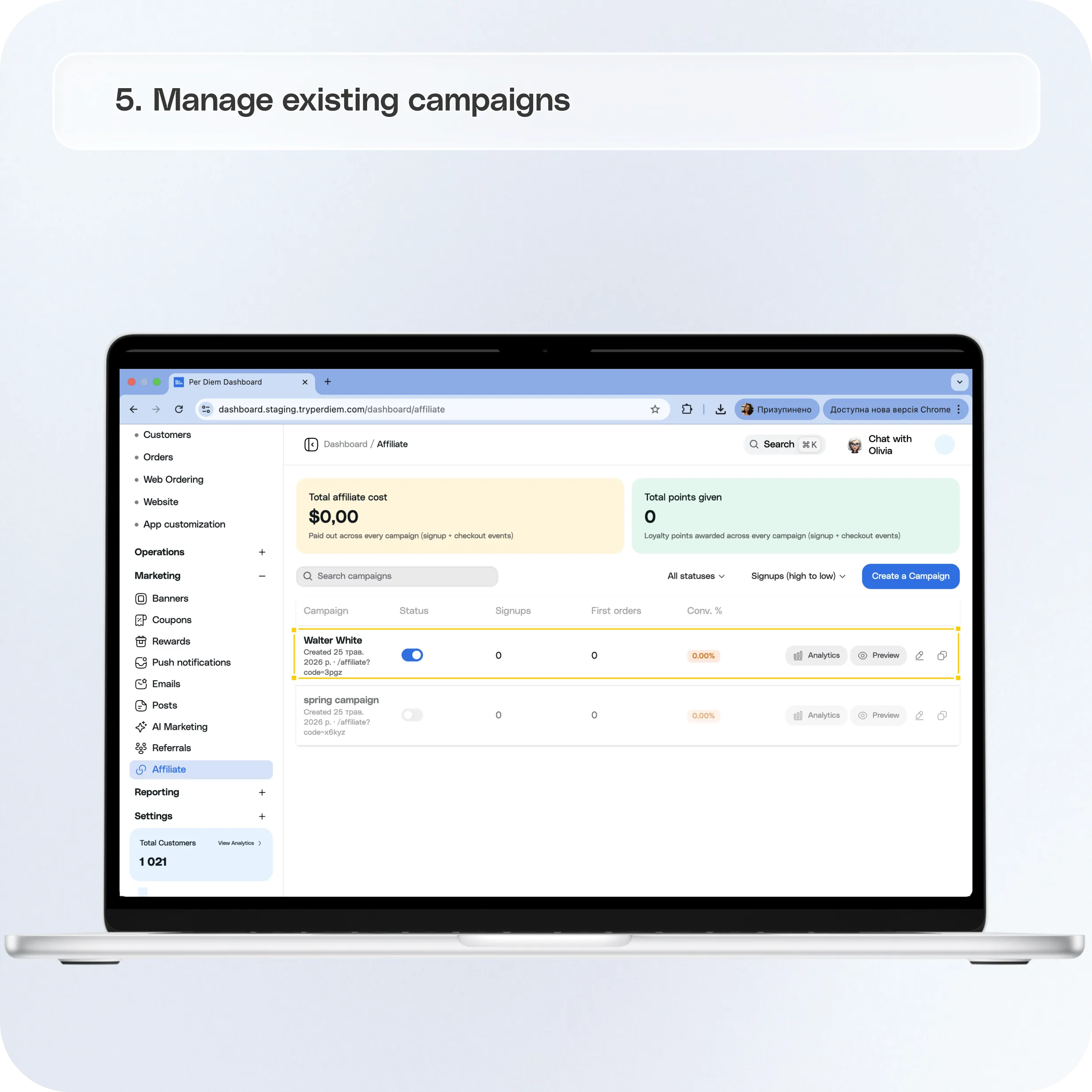
Manage Existing Campaigns
From the Affiliate dashboard you can:
- Search campaigns
- Filter campaigns
- Enable or disable campaigns
- Copy campaign links
- Preview campaigns
- View analytics
Why this matters
Affiliate campaigns help merchants:
- Grow customer acquisition through trusted partners
- Reward customers for joining and purchasing
- Track campaign performance automatically
- Measure signups, conversions, and campaign cost in one place
Affiliate marketing gives merchants a simple way to turn partnerships into measurable customer growth.
Still have questions?Contact us
Ask anything or just say hi