




















Restaurants
How to Create a Restaurant Website That Gets You on Google's First Page
Jun 15, 2026
TLDR
When people decide where to eat, Google is usually the starting point. They search for a cuisine, a dish, or a restaurant nearby. In a matter of seconds, they compare options, scan menus, check photos, and choose where to order or dine. If your restaurant does not appear in those search results, you're losing customers before they ever have a chance to experience your food.
For many restaurant owners, building a website feels overwhelming. You're already managing staff, inventory, orders, and guests—you shouldn't have to become a web developer too.
The good news is that creating a restaurant website is easier than ever. Modern website builders designed specifically for restaurants make it simple to showcase your menu, accept online orders, promote events, and keep your information up to date without the cost or complexity of hiring an agency.
A great website is one of the highest-return investments you can make for your restaurant. It helps new customers discover you, gives regulars an easy way to order, and creates a direct channel you control. This guide will walk you through how to create a restaurant website that not only looks great but also helps your business get found online.
1. Choose a Restaurant Website Builder Designed for Search Visibility
Many restaurant websites look attractive but struggle to rank because they were created with design as the main priority. Google cares about something different. It wants websites that are easy to understand, easy to navigate, and easy to load.
That starts with the platform behind your site.
A restaurant website builder should automatically handle technical elements that affect rankings, including page structure, mobile responsiveness, metadata, image optimization, and clean URLs. These are not features most restaurants want to manage themselves, but they have a direct impact on how search engines evaluate a website.
Another important factor is content flexibility. Your website should allow you to create pages for your menu, locations, ordering, catering, private events, and other services. Each page gives Google additional context about your business and creates more opportunities to appear in search results.
For restaurants using Square, choosing a website that connects directly to your POS can save hours of manual work every week. When your menu, pricing, item availability, and business information stay synced automatically, customers always see accurate details online. That consistency improves the guest experience and helps prevent the frustration that comes from outdated menus or incorrect hours.
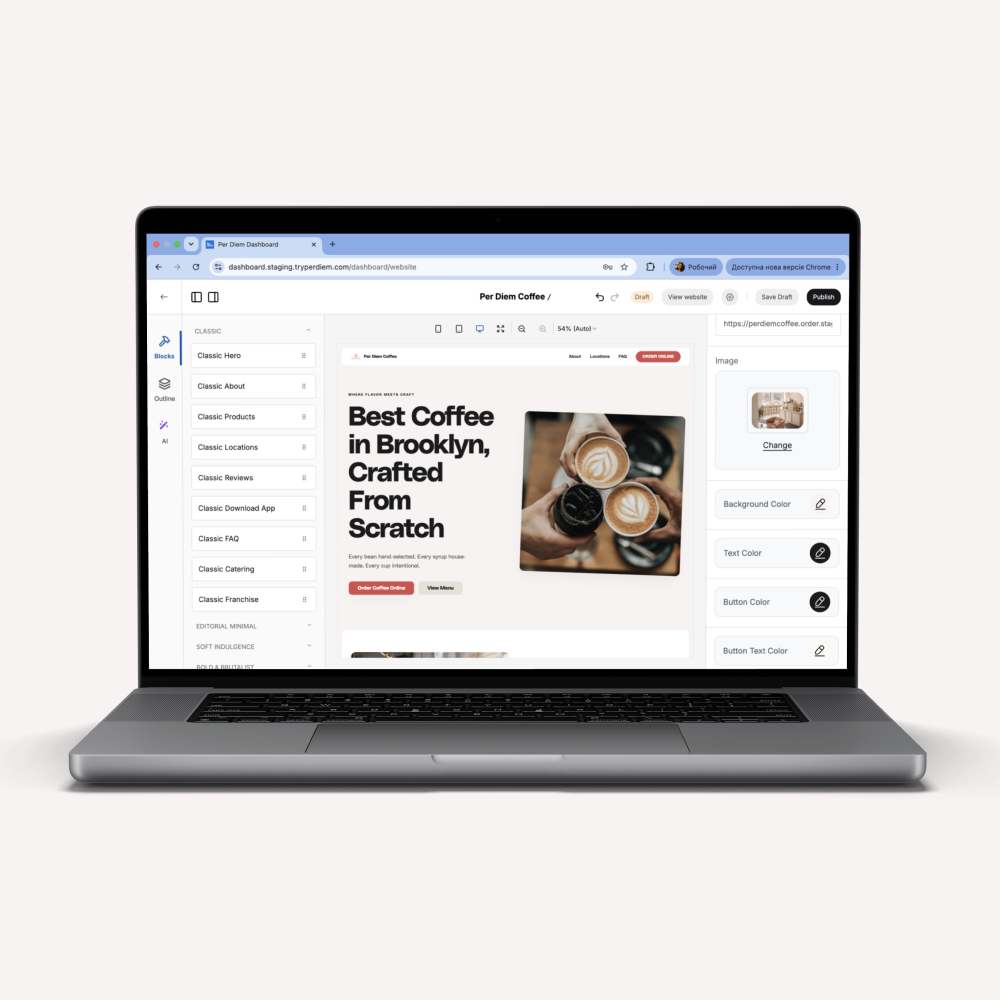
Per Diem's Website Builder is built specifically for Square restaurants and includes automatic menu syncing, mobile-first design, built-in SEO features, online ordering pages, and flexible layouts for locations, catering, and events. Instead of managing multiple systems, restaurant owners can update everything from one place while giving Google the fresh, accurate content it values.
Before thinking about SEO tactics, keywords, or content strategies, make sure your website is built on a platform designed to support long-term search growth.
2. Build Pages Around What Customers Are Actually Searching For
One of the biggest mistakes restaurants make is creating a website around internal language instead of customer language.
We know that you know your restaurant’s concept inside and out. Customers do not.
Someone searching online is rarely typing phrases like "chef-driven seasonal dining experience." They are searching for things like:
- Best sushi restaurant in Seattle
- Breakfast near me
- Italian restaurant in Brooklyn
- Vegan burgers in Austin
- Coffee shop with outdoor seating
Your website should naturally include the terms people use when looking for businesses like yours.
A good place to start is your homepage. Within a few seconds, both visitors and Google should understand:
- What type of food do you serve
- Where you're located
- What makes your restaurant worth visiting
The same principle applies to other pages throughout the site.
For example, instead of using a heading like "Our Story and Philosophy," a page title such as "Family-Owned Mexican Restaurant in San Diego" provides clear context while still feeling natural.
This does not mean forcing keywords into every paragraph. Search engines have become much better at understanding context. Your goal is simply to communicate clearly and use the same language your customers use.
A useful test is to ask yourself:
"If someone landed on this page with no other information, would they immediately know what restaurant this is, what food we serve, and where we are located?"
If the answer is no, Google may be struggling to understand it too.
3. Create Dedicated Pages for Your Most Important Revenue Channels
Google ranks individual pages, not entire businesses.
That means each major part of your restaurant should have its own dedicated page instead of being squeezed onto one homepage.
Many restaurants miss valuable search opportunities because everything lives on a single page.
A stronger website structure typically includes:
Menu Page
Your menu should exist as searchable text on the website.
PDF menus create a poor experience on mobile devices and make it harder for search engines to understand what dishes you serve.
When menu items are displayed directly on the page, Google can connect your restaurant with specific foods customers are searching for.
Online Ordering Page
If you offer pickup or delivery, create a dedicated ordering page.
This gives customers a direct path to purchase while also helping search engines understand that online ordering is an important part of your business.
Clear calls to action and a simple ordering experience can improve conversion rates significantly.
Location Pages
Restaurants with multiple locations should create a separate page for each one.
Each location has its own address, hours, contact details, and local audience. Individual pages help Google match the correct location to local searches.
For example, a customer searching in Denver should see your Denver location rather than a generic company page.
Catering and Private Events Pages
Catering services often have completely different search behavior compared to regular dining.
Someone searching for "office catering in Chicago" has a very different intent than someone searching for dinner options.
Dedicated pages allow you to target those searches directly while making it easier for customers to find the information they need.
A simple website structure often performs better than a complicated one. Every page should have a clear purpose, answer a specific question, and help visitors take the next step.
4. Strengthen Your Local SEO with Google Business Profile
A great website and a strong Google Business Profile work together.
When someone searches for restaurants nearby, Google looks for consistent information across your online presence. Your website helps confirm that your business is active, trustworthy, and relevant to local searches.
Start by claiming and completing your Google Business Profile if you have not already done so.
Make sure these details match your website exactly:
- Restaurant name
- Address
- Phone number
- Business hours
- Website URL
Even small differences can create confusion for search engines.
Choose the most accurate business categories and upload recent photos of your dining area, popular dishes, and exterior signage. Add attributes that matter to customers, such as outdoor seating, delivery, takeout, or reservations.
Your website should also make your location details easy to find. Include your address, phone number, and opening hours in the footer and on dedicated location pages.
If you serve multiple cities or neighborhoods, mention them naturally throughout your site where relevant. This helps Google connect your restaurant with nearby searches.
According to Google, businesses with complete profiles are more likely to attract clicks, calls, and direction requests.
5. Make Your Website Fast, Mobile Friendly, and Easy to Use
Most restaurant searches happen on a phone.
People are often looking for a place to eat while they are already out, making plans with friends, or deciding where to order from. If your website is slow or difficult to navigate, they will leave quickly and choose another option.
Google pays close attention to this behavior.
A strong restaurant website should load quickly and make it easy for customers to take action.
Focus on these essentials:
- Keep image sizes optimized without sacrificing quality
- Use clear buttons for ordering, reservations, and directions
- Make menus easy to read without zooming in
- Avoid pop-ups that cover important information
- Keep navigation simple and consistent
Every extra step creates friction.
A visitor should be able to land on your website and find your menu, hours, and ordering options within seconds.
Restaurant website builders designed for the industry often handle many of these technical improvements automatically, which helps maintain a better experience as your site grows.
6. Build Trust with Reviews, Photos, and Helpful Content
Google wants to recommend businesses that people trust.
Your website should show clear signs that real customers enjoy your restaurant.
One of the easiest ways to do this is by featuring recent reviews directly on your website. Testimonials provide fresh content while helping visitors feel confident about trying your restaurant.
Photos matter too.
Skip generic stock images and use real photos of your dishes, dining space, team members, and events. Authentic visuals set expectations and help guests picture themselves visiting your restaurant.
You can also build trust by answering common questions before customers need to ask.
Consider adding information about:
- Parking availability
- Private events
- Catering services
- Reservation policies
- Delivery areas
This type of content improves the customer experience and increases the chances of appearing in search results for specific questions.
The goal is simple: give people enough information to choose your restaurant without needing to leave your website.
Learn how to earn 5-star reviews for your restaurant fast.
7. Keep Your Website Updated to Maintain Rankings
Search visibility is not something you set up once and forget.
Google favors websites that stay accurate and active.
Review your website regularly to make sure details are current, especially your:
- Menu items
- Prices
- Seasonal offerings
- Business hours
- Special events
- Promotions
Adding fresh content throughout the year also creates new opportunities to appear in search results.
You do not need to publish articles every week. Even small updates, such as adding a holiday menu, promoting a community event, or creating a catering page for busy seasons, can help.
The easier it is to update your website, the more likely you are to keep it current.
That is why many restaurants choose website platforms that sync directly with their POS system and allow updates from a single dashboard.
Get Found First, Then Give Customers a Reason to Choose You
Getting your restaurant onto Google's first page does not come down to one tactic.
It comes from combining the right foundation with clear information, a strong local presence, fast performance, and a website that stays current.
Most restaurants lose search traffic because their websites are outdated, difficult to manage, or missing key information customers expect to find.
A restaurant website should do more than look good. It should help people discover your business, explore your menu, place orders, and become regular guests.
If your current website makes those goals harder instead of easier, it may be time for a platform built specifically for restaurants.
Per Diem's Website Builder helps Square restaurants create SEO-friendly websites with automatic menu syncing, built-in online ordering, mobile-first design, and flexible pages for locations, catering, and events so you can spend less time managing your site and more time running your restaurant.
Book a demo to get a free walk-through of your website builder.